
WebUI Manager - A self-hosted dashboard for your dashboards
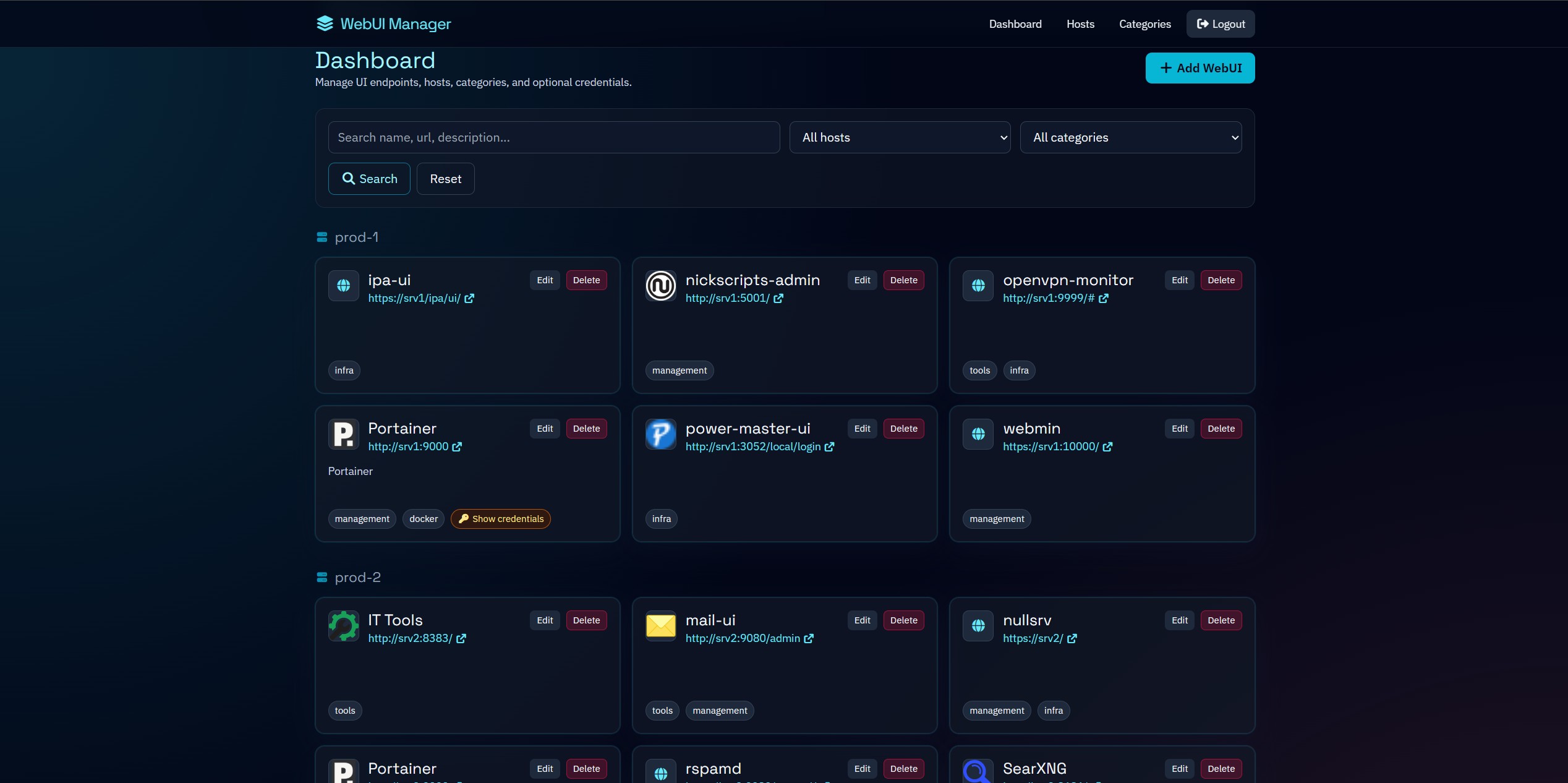
So here's the thing - if you're into self-hosting, you already know what's up. You've got a server - or maybe a few - and you're running all kinds of stuff on it - media servers, monitoring stacks, container managers, download clients, home automation, you name it.
At first, you remember them, but at a certain point, you've got a few too many services running, and you start asking yourself: "Wait, what port was that thing on again?" And so you make a note somewhere. Maybe it's a text file. Maybe it's a bookmark folder, but as if I need more bookmakrs. For me, it was a spreadsheet - and honestly, I got fed up with it blinding me at 1 am due to a lack of a proper dark mode.
So I sat down one Sunday afternoon and built something tiny and lightweight to solve that specific problem. That's WebUI Manager.
What It Is
WebUI Manager is a small, self-hosted Flask app that gives you a clean dashboard for all your internal web services. You add your services, optionally assign them to a host and a category, and they show up in a grouped, filterable view that you can actually navigate without squinting at a spreadsheet.
It's not trying to be a full-on Heimdall or Homer alternative with a million integrations - it's just a clean, practical way to keep track of what's running where, with a couple of useful extras thrown in.
The Features
Service dashboard grouped by host - Your services are organized under whichever server or machine they're running on. At a glance, you can see exactly what each host is running.
Full-text search and filtering - Search by name, URL, description, host, or category. You can also filter the whole dashboard down to a specific host or category tag in one click.
Automatic favicon discovery - The app fetches and caches the favicon for each service automatically. It parses <link rel="icon"> tags from the service's HTML and stores the URL so it doesn't have to fetch it again on every load.
Optional credential storage - You can optionally store a username and password for each service. These are encrypted at rest in the database using Fernet (AES symmetric encryption). There's a reveal button on each card to show the credentials when you need them. Worth noting: this encryption is reversible by design - it's a convenience feature, not a secrets vault. Don't treat it like one.
Host and category management - You can create, edit, and delete hosts and categories through the UI. If a host or category is still in use by a service, the app won't let you delete it until you remove the dependency first.
First-run admin bootstrap - On the first launch with an empty database, the app prompts you to create an admin user and set a password. That password is hashed and can't be reversed. The encryption key for stored credentials is derived from your SECRET_KEY (or a separate APP_CREDENTIALS_KEY if you set one).
Automatic schema creation - Tables are created automatically on the first request. No SQL files to run manually, no migration scripts to worry about.
The Stack
The backend is Flask with SQLAlchemy for the ORM, backed by MySQL or MariaDB. The frontend is Tailwind CSS with vanilla JavaScript - no frameworks, no build step on the client side. The UI has a dark theme with a cyan accent palette. Fonts are IBM Plex Sans and Space Grotesk, icons are Font Awesome.
The app ships as a Docker image published to Docker Hub at nullata/webui-manager.
Setting It Up
You need a MySQL or MariaDB database. Create it and a user for the app:
CREATE DATABASE IF NOT EXISTS webui_manager
    CHARACTER SET utf8mb4
    COLLATE utf8mb4_unicode_ci;

CREATE USER IF NOT EXISTS 'webui'@'%' IDENTIFIED BY 'your_password_here';
GRANT ALL PRIVILEGES ON webui_manager.* TO 'webui'@'%';
FLUSH PRIVILEGES;
Then set up your .env file. The minimum you need:
SECRET_KEY=something-long-and-random
DB_USER=webui
DB_PASSWORD=your_password_here
DB_HOST=your-db-host
DB_NAME=webui_manager
Docker Compose - pre-built image
services:
  app:
    image: nullata/webui-manager:latest
    pull_policy: always
    restart: unless-stopped
    ports:
      - "${APP_PORT:-5000}:5000"
    env_file:
      - .env
docker compose up -d
Docker Compose - full stack with MariaDB
If you want Compose to manage the database as well:
services:
  db:
    image: mariadb:11
    restart: unless-stopped
    environment:
      MARIADB_ROOT_PASSWORD: ${DB_ROOT_PASSWORD:-rootpassword}
      MARIADB_DATABASE: ${DB_NAME:-webui_manager}
      MARIADB_USER: ${DB_USER:-webui}
      MARIADB_PASSWORD: ${DB_PASSWORD}
    volumes:
      - db_data:/var/lib/mysql

  app:
    image: nullata/webui-manager:latest
    pull_policy: always
    restart: unless-stopped
    depends_on:
      - db
    ports:
      - "${APP_PORT:-5000}:5000"
    environment:
      SECRET_KEY: ${SECRET_KEY}
      APP_CREDENTIALS_KEY: ${APP_CREDENTIALS_KEY:-}
      DB_HOST: db
      DB_PORT: ${DB_PORT:-3306}
      DB_USER: ${DB_USER:-webui}
      DB_PASSWORD: ${DB_PASSWORD}
      DB_NAME: ${DB_NAME:-webui_manager}
      AUTO_MIGRATE: ${AUTO_MIGRATE:-true}

volumes:
  db_data:
docker compose up -d
Once it's running, navigate to http://your-host:5000. If no admin user exists yet, the app will redirect you to the setup page automatically.
Environment Variables
| Variable | Required | Default | Description |
|---|---|---|---|
SECRET_KEY |
Yes | - | Flask session signing key |
DB_USER |
Yes | - | MySQL/MariaDB username |
DB_PASSWORD |
Yes | - | MySQL/MariaDB password |
DB_HOST |
No | 127.0.0.1 |
Database host |
DB_PORT |
No | 3306 |
Database port |
DB_NAME |
No | webui_manager |
Database name |
DATABASE_URL |
No | - | Full SQLAlchemy URL, overrides all DB_* fields |
APP_CREDENTIALS_KEY |
No | Falls back to SECRET_KEY |
Separate key for credential encryption |
AUTO_MIGRATE |
No | true |
Auto-create tables on first request |
APP_PORT |
No | 5000 |
Port exposed by the Docker container |
One Thing to Keep in Mind
Apparently this needs to be said, well - written, but this app is designed to run on your internal network, not exposed to the open internet. The credential storage is encrypted, but the encryption is reversible - it's meant to save you a few clicks, not to be a production secrets manager. Keep it behind a firewall or a VPN, and you're going to be fine.
Source and Image
- GitHub: github.com/nullata/webui-manager
- Docker Hub: hub.docker.com/r/nullata/webui-manager
Licensed under the Apache License 2.0.
Join the conversation
Like & Comment on